
Kids and the Internet: Where do You Draw the Line?

Tracking Pixel

This is a sponsored post written by me on behalf of Torch.

Parenting is rough. There are so many obstacles that you face with your children on a day to day basis it can get pretty overwhelming. It’s nice to be able to talk to your parents, grandparents and others to give you sound-bits and advice on what they’ve already been through – on whats worked, and what hasn’t. But when it comes to technology, and your kids uses and freedoms of it, well this isn’t a topic that they can help with. This is an all new chartered territory that unfortunately our parents can’t give us advice on. Setting up rules and regulations for internet usages, the do’s and the don’ts can be a bit overwhelming. That’s why I’m excited to see programs like Torch launch to help give the power back to the parents.Torch

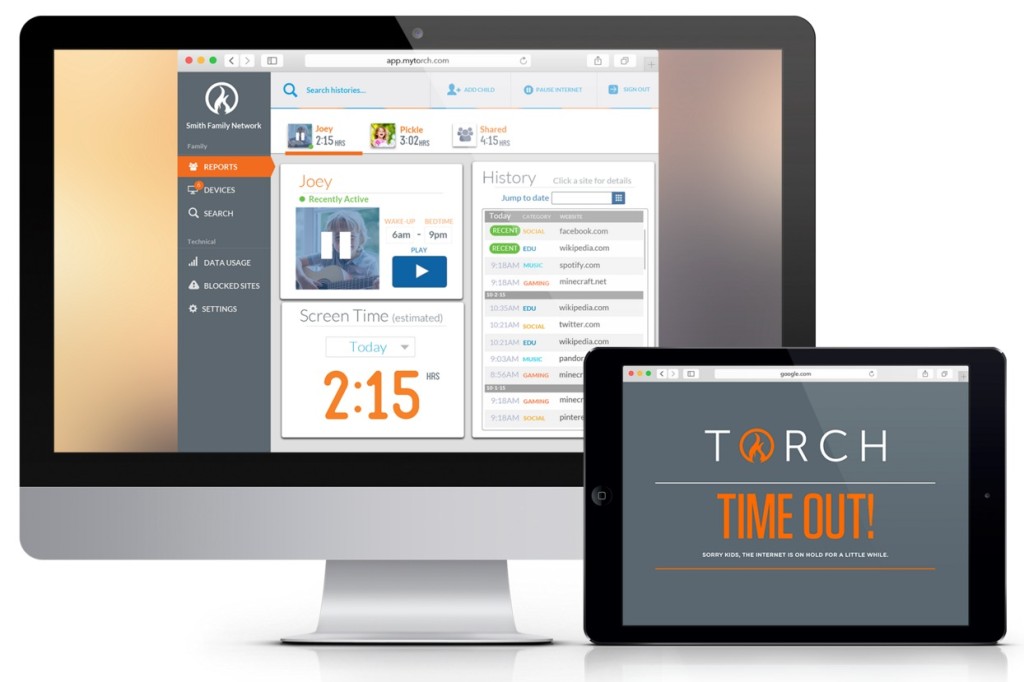
Torch is a router with parental tools that allow you to filter content, limit usage during certain times, and gives you reports on what your kids are doing online. Torch not only allows you to set healthy boundaries for your children online, but keeps them accountable for the sites they visit, and the length of time they spend online.

Here’s a few main reasons why I love Torch ,and would recommend it to family and friends:
Limited Screen Time. Set a screen time limit for internet usage for each child – we all know time gets away from us, but having limited screen time helps balance their lives so they aren’t spending all their time online. It also helps a ton with time management, because they get done what has to be done first since they know its limited!

Pause. If the kids need to eat dinner, take out the trash or let the dog out, they don’t have to worry that they are missing out on their internet time. The pause button allows them to pick up the time from where they left off – causing less arguments and fits when they need to do something else.

Content Customization.  Restrict and block certain websites based on content – no need to worry about your kids exploring the internet and ending up on the wrong website.

Internet Bedtime. My. Absolute. Favorite. If you have kids like mine every single time I tell them it’s time to get off line I hear, “I’m almost done.” , or “just one more level”, or “the video is almost over!” The internet bedtime gives them a countdown so they are well aware of the time remaining – and shuts down immediately at bedtime. No fighting and arguing with the kids about getting offline – bam! It’s done.

torch_router

Check out all that Torch has to offer and allow your kids the freedom to search the internet – all while keeping them safe!


This is a sponsored post written by me on behalf of Torch.

Posted in Techy | Leave a comment

Making Presentations POP with Knovio Pro

This is a sponsored post written by me on behalf of Knovio for IZEA. All opinions are 100% mine.

As many of you know, blogging is not my full-time career. For nearly ten years I’ve worked as an licensed insurance agent for a well known insurance provider. My two primary responsibilities are sales and marketing, which I do from a satellite office (meaning my boss is actually in a different location, which at times can be a blessing). There are many times when I have marketing and sales ideas to implement in our office that I have to travel to his because it’s a bit too difficult to explain over the phone or just in an e-mail, or even a powerpoint presentation. Time is money, so taking the time to drive there, sit with him and review, and drive back – well that’s wasting precious time!

Knovio4.jpeg

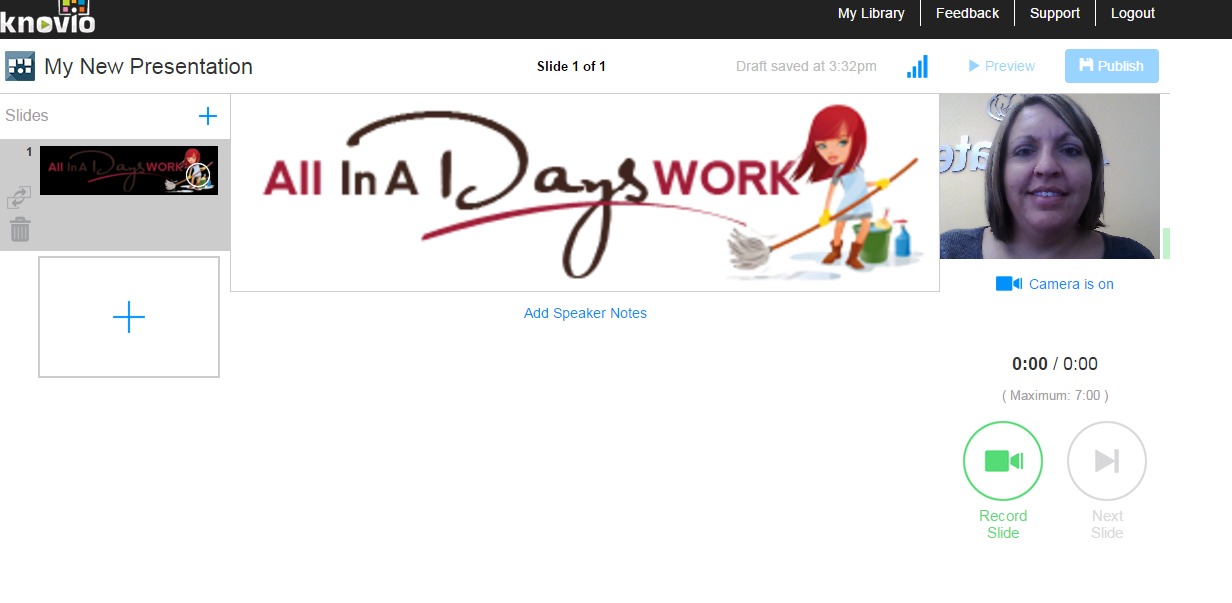
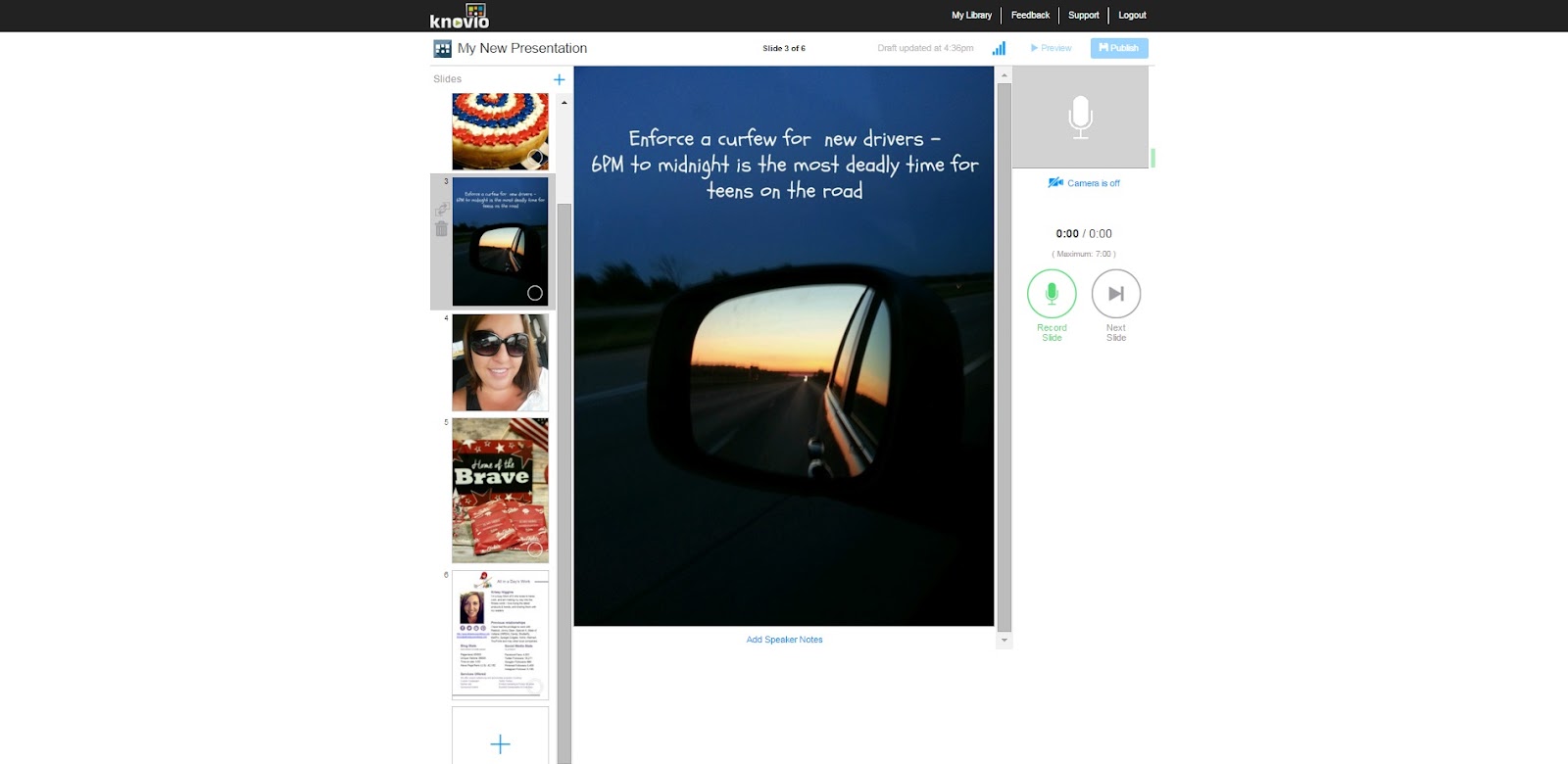
That was until I discovered Knovio. Knovio is one of the easiest and most creative way to create multimedia content –  it’s easy as uploading your PowerPoint slides, images, PDF’s and you can even record video and audio commentary (my absolute favorite part) to share with whomever you want. (I’m not sharing my marketing plan that I created,but giving you a step-by-step that I am creating for a media kit for my blog). One of the key features is you can even download the app and create presentations on your phone!

Knovio.jpeg

There are a lot of things to love about this program, but being easy to use would probably be my favorite. I am not completely illiterate when it comes to apps and programs, but I’m definitely not a computer whiz either. There have been a ton of programs and software that I have gotten rid of simply because I either didn’t have the patience (or time) to learn it, or it just proved to be that difficult. If you are somewhat familiar with PowerPoint, using Knovio will be a piece of cake.

Secondly, another favorite that competes with the ease of use, is the option for video/sound capabilities. This is the tool keeps me from traveling to multiple sites and spending valuable time where I could be more productive – it allows me to reach multiple locations and people all at once!Being able to voice my ideas, (and yes video as well, because well, I love hand gestures) gives me the freedom of making my presentation virtually flawless with the ability to edit and correct the video/audio errors and re-record (sure can’t do that in person).

Knovio isn’t just for someone in sales and marketing – Knovio can be used for pitching an idea, enhancing your resume, practice a speech, document your travels, illustrate a process, tell a story, even create lesson plans (which I think would be great for virtual students, or even homeschoolers).

Knovio3.jpeg

I lovethe PRO version of Knovio which is completely worth it for the extra features. It has a KnowledgeVision’s Ask App which enables you to create a multi-part, multi-question quiz an assessments that you can add to any Knovio presentation. It also has a Guestbook which makes it possible to ask everyone to ‘sign in’ so you can track and score individuals, and a SCORMconnect system which allows you to integrate your presentations into a SCORM- based learning management system. (again perfect for teachers, lesson planners, homeschoolers, and even employers!) Try Knovio Pro


Knovio2.jpeg

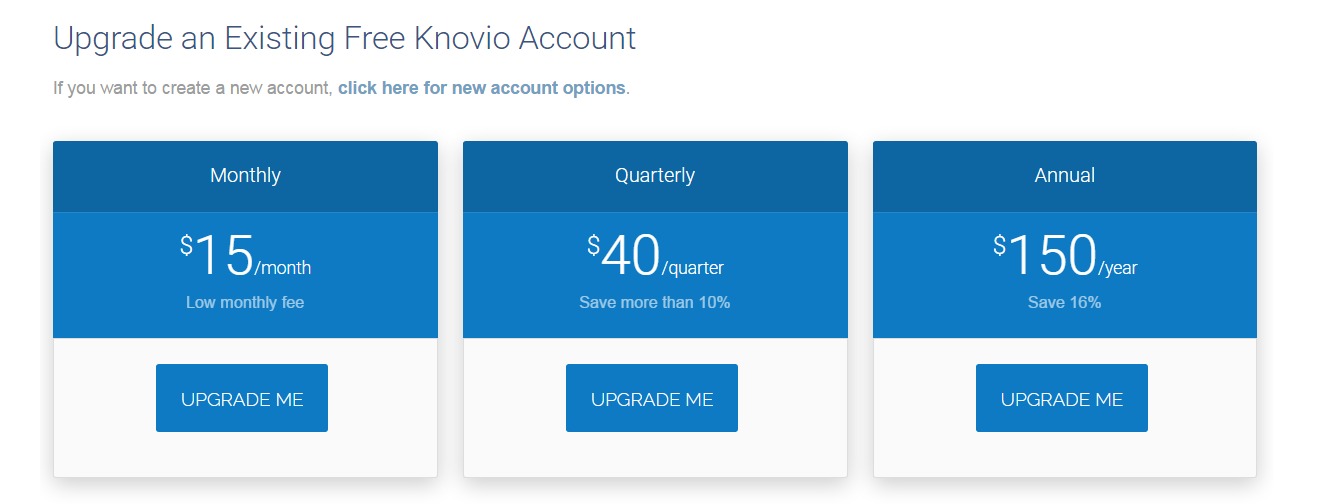
Kovio is so confident in their program that they are offering a FREE 14 day trial of their basic service – and the ability to upgrade with easy monthly, quarterly or annual payments for the service..and there are so many reasons to subscribe:

  • Three easy steps to create a Knovio

  • Unlimited presentations

  • Available 24/7 from anywhere in the world

  • Easily correct mistakes and flubs with a unique no-record capability

  • Share it by email, website, or social media

  • PowerPoint animations supported

  • Export hi-def 1080p video files

  • A full library of customizable design templates

There’s still quite a bit of work I want to do on my final Knovio presentation; I’m pretty sure I could work on it for hours to try and get it just right – mostly re-recording the video and audio. I completely love this program, and cannot wait to send my first virtual pre-recorded presentation to my boss and marketing team. I also think that my virtual Media Kit for my blog will definitely impress PR agencies and put me leaps and bounds ahead of the competition.

What would you use Knovio Pro for?

Visit Sponsors Site

Posted in Money Matters, Reviews/Giveaways | Leave a comment

Jenny Craig Starter Pack now Available Exclusively at Walmart

I was provided a free Jenny Craig Weight Loss Starter Kit. However, the opinions expressed are entirely my own.

When it comes to weight loss, the biggest struggle I have (and those I’ve talked to about the struggles of losing weight) is food. The hard thing about food is it’s not like other things that you might be addicted to that you just cut out of your life altogether – you have to learn your boundaries. What causes your triggers for overeating, learning to eat the right (healthy) foods that are nutritious and filling.

If you’re like me you have always wanted to have someone do the cooking and preparing for you; imagine not having to worry about counting calories, carbs and fat grams. Planning breakfast, lunch,dinner and snacks. That alone can be stressful. That’s why I was so excited to try the the 3 Day Jenny Craig starter kit, available exclusively at Walmart now.

jenny_craig_starter_kit

Like so many other things I’ve wanted to give Jenny Craig’s food plans a try, but let’s be honest – not everyone wants to spend a ton of money on a month worth of food that they don’t even know if they will like. So this Starter Kit is the perfect way for you to try it out, and get a head start on your weight loss plan.

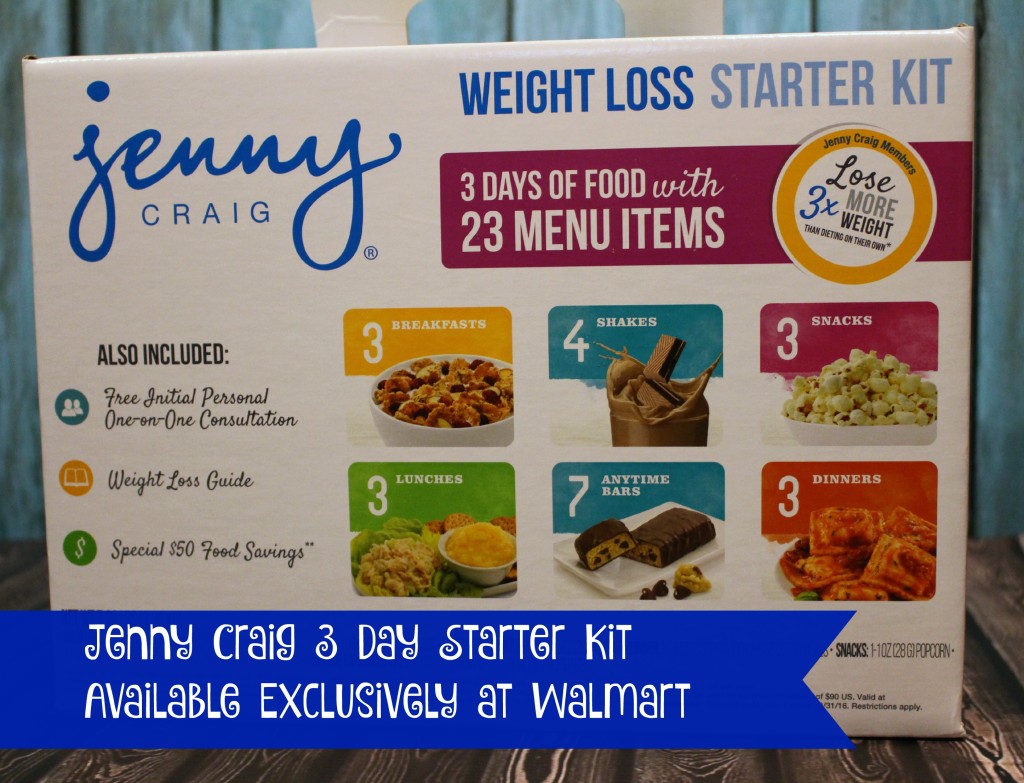
jenny_craig_starter_kit_mealThe Jenny Craig 3 Day Starter Kit comes with 3 days worth of food – breakfast, lunch, dinner, and a snack as well as dream shakes and some anytime bars for when you are feeling extra hungry.



Also included in the kit is a free initial personal one-on-one consultation at any Jenny Craig center. You also would receive a special $50 food savings coupon when you join Jenny Craig!

I really like the Jenny Craig Dream Shakes  which is a protein and fiber enhanced shake with essential vitamins and mineral, perfect for after a work out. The Starter Kit comes with 4 shakes for you to try!

jenny_craig_dream_shakes

I also love the Chocolate Peanut Butter Anytime Bars. A rich, creamy, peanut butter snack bar with crunchy soy crisps covered with creamy chocolate. A delicious bar that serves as one milk replacement, as well as a vitamin and mineral supplement to complement your Jenny Craig Menu. Each bar contains 4g fiber and 10g protein. 7 bars per box.

jenny_craig_anytime_bars

Be sure to head to Walmart today to check out the #JennyCraigKit you can find it in the diet/weight loss isle! 

jenny_craig_2

Posted in Fitness/Health | 23 Comments

Ultimate Savings and Convenience with the CurrentC App

This is a sponsored post on behalf of CurrentC. Though I was compensated for my time, all opinions are my own.

CurrentC is a money saving app that brings all the parts of sale and bargain shopping into one. By bringing payments, offers and loyalty together all in one -it’s the only app you will need to get all the best deals that are out there – together, in one app.

CurrentC is  accepted in many of the places that you already shop; giving you the freedom to focus on what you want and need, with the app doing all the work for you. Personally, I don’t like wasting time  standing in the store pulling up multiple coupon apps, loyalty apps, and rebate apps trying to match everything up, calculate the savings, and figure out which is better than the other. I’m a busy Mom with 2 jobs, 3 kids and a  house to take care of. I love love saving money – and you you know I love a good deal – but it needs to be time efficient as well as cost efficient.

current_c

CurrentC is currently in beta testing, so if you are near the Columbus area or shop there often, you can try it out now! Until then, you’ll have to be patient for the release – but check out the ease of of the set-up and how you can save!

When you download the app via GooglePlay or the AppStore, you’re able to set up a PIN number to protect your loyalty and gift cards that you download into the app. No need to carry dozens of cards, upload them in the app and just carry your phone!

CurrentC Loyalty

After you’ve uploaded your gift cards and loyalty cards, you can search locations for stores you frequent, and then view the offers available at each store.

We shop at CVS quite often – which is awesome since you’re ExtraCare can be uploaded right to the app. The ExtraCare account is processed with your payment and clipped offers all in one scan, right at the checkout. Right now through 11/19 there is an offer for $5 ExtraBuck Reward after your first purchase using CurrentC when you use your ExtraCare account.

currentc_appUnlike other apps, CurrentC even offers discounts on restaurants, like Wendys.  Right now just by downloading the CurrentC app, you will get an offer for a free frosty when you pay with CurrentC through 11/16 . To redeem, just go to offers and “clip” the free frosty offer!

currentc_app_screenshot

Posted in Deals, Money Matters, Uncategorized | Leave a comment

Nutter Butter Turkeys

If you are looking for a simple and cute recipe for the Thanksgiving season -look  no further! These Nutter Butter Turkey treats are not only tasty,but make a super cute centerpiece, and also a cute garnish to add for your kids school thanksgiving festivities!

Nutter turkey cookie 2-2


Ingredients:

Package of Nutter Butter cookies
Container of mini candy eyes
Orange M&M’s

Royal Icing Ingredients:

2 egg whites
1 C powder sugar
1/2 tsp cream of tartar
red & orange gel food coloring

Directions:

Assembly directions for the Nutter Turkey will follow the directions for the royal icing.

Icing Directions:

-Combine all ingredients in a mixing bowl mixing on medium speed for 4 minutes. (except your food coloring)
-If icing is not stiff enough add 1/4 C powder sugar.
-Divide the icing into thirds
– The first bowl add several drops of orange gel food coloring. Stir to blend.
-In the second bowl, add drops of red gel food coloring, mixing well to incorporate the color.
-The third bowl of icing remains white,
-Pour each color of icing into individual frosting bags with a #5 tips. Twist the open end of the bag to push the icing to the tip.

Nutter Turkey Assembly Directions:

-Lay out several Nutter Butter cookies.
-Separate the orange M&M’s on a plate.
-Pour out the mini candy eyes in a small bowl.
-Using the picture of the Nutter Cookies for an outline.
-After referring to the picture, decide where you want to place the eyes, make a small dot on the cookie with white icing and place the candy eyes over the dots. Allow a few seconds for the eyes to dry.

Nutter turkey cookie inprocess1
-Apply a small dot of orange icing in the area for the nose, hold the orange M&M to the orange icing for a 30 seconds until it “glues” on to it.
-With the frosting bag of red icing draw a “waddle” on the side of the turkey’s face coming from the side of the orange nose.

Nutter turkey cookie inprocess 2
-Allow the icing to completely dry for about an hour or until when you touch the waddle it is dry.

nutter_butter_turkeys

Posted in Holidays, Recipes | Leave a comment